Showing posts with label view. Show all posts
Showing posts with label view. Show all posts
Thursday, February 26, 2015
How Do I View Articulate Presentations On an iPad

Watching or playing with anything in Flash Format on an iPad (iPhone or iPod) was impossible (as far as I know) in the past. Well, now you can at least view Flash stuff on an iPad using the app called iSWIFTER (Source).
HOW?
Here we go:
HOW?
Here we go:
Click here to keep yourself updated with latest discussions about Articulate on iPads.
STILL TROUBLESOME!
Alright, it is still troublesome, but I suppose within the next few months Steve Jobs will figure out that supporting Flash is not so bad after all (Otherwise most e-learning content in Malaysia will be useless on an iPad). Or perhaps Adobe (behind Flash) figures out a way to please all Steve Jobs requirements to make Flash safe and smooth in an Apple world.
As for now, you will have to use apps like iSWIFTER to explore your Articulate presentations on an iPad. Lets hope that Apple embraces Flash fully in the near future. If not, then we have to find creative solutions, because certainly it will be tough to learn without an iPad or iPhone in the future.
But, how do we view Articulate presentations on an iPhone? Can anyone enlighten us with possibilities? :)

Thursday, February 5, 2015
Deliver great presentations with Presenter view
Presenter View is one nifty feature of PowerPoint 2010 and PowerPoint 2013 which lets you view the slides, speaker notes on one computer (laptop), while the audience views just the slideshow on another monitor or projector.
Using Presenter view you can control the slide show, jump around the slides and blacken the screen for the audience while keeping your view of the presentation and speaker notes intact on your own monitor. Presenter view lets you track the time elapsed so that you stick to the schedule. If you want to highlight something while presenting, use annotation or pen tool.
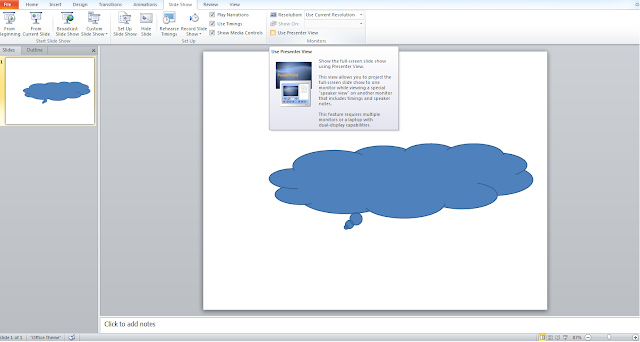
You just need to connect your laptop to another monitor/projector and select the option "Use presenter view" from Slide Show tab before you go for slide show mode of presentation. Presenter view is surely gonna help you deliver one of those effective presentations.
Here is a quick video which explains it all:
You just need to connect your laptop to another monitor/projector and select the option "Use presenter view" from Slide Show tab before you go for slide show mode of presentation. Presenter view is surely gonna help you deliver one of those effective presentations.
Here is a quick video which explains it all:
Subscribe to:
Posts (Atom)